
Want your debt payoff plan in a spreadsheet you can keep updating? This free spreadsheet works in Google Sheets and Excel. Enter your debts, choose the snowball or avalanche method, and it calculates your payoff order, your debt-free date, total interest and a month-by-month schedule. Extra payments roll to the next debt automatically.
Free Debt Payoff Spreadsheet
- Up to 10 debts
- Snowball or avalanche in one click
- Debt-free date, payoff order and total interest
- Month-by-month payoff schedule
- Monthly tracker: your real balances vs. the plan
Free, no sign-up. Works in Excel, Google Sheets and LibreOffice.
How to open it in Google Sheets
- Download the spreadsheet with the button above.
- Go to Google Drive and click New, then File upload, and choose the file.
- Right-click the uploaded file and choose Open with, then Google Sheets.
- Optional: in Google Sheets, choose File, then Save as Google Sheets to keep an editable copy.
How to use the spreadsheet
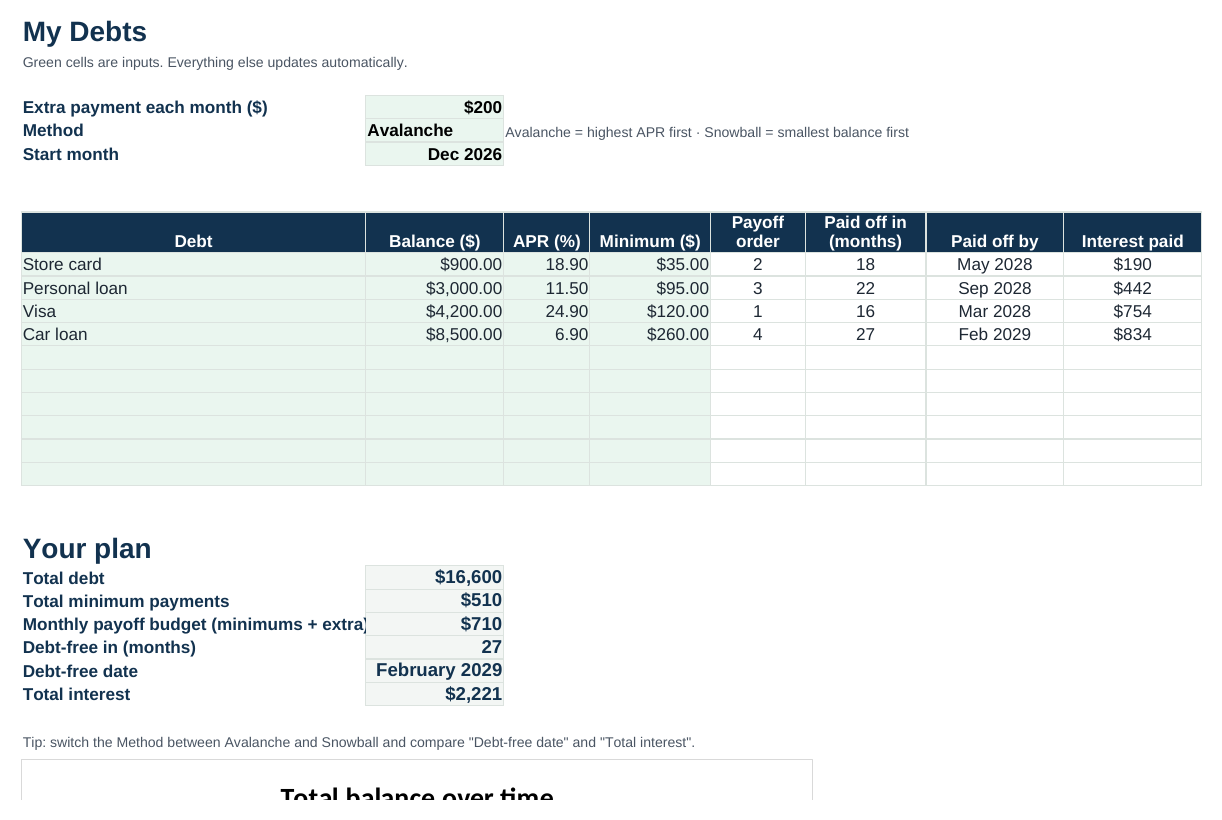
- My Debts tab: replace the example debts with yours: name, balance, APR and minimum payment. Only the green cells are inputs.
- Enter your extra payment: the amount you can add every month on top of all minimums.
- Pick a method: Avalanche (highest APR first, least interest) or Snowball (smallest balance first, quickest wins).
- Read your plan: payoff order, the month each debt is gone, your debt-free date and total interest.
- Payoff Schedule tab: see exactly where every payment goes each month.
- Monthly Tracker tab: type your real total balance each month to see if you are ahead of or behind plan.
Example: the same debts, two methods
The spreadsheet comes filled in with the four-debt example from our guides ($16,600 total, $510 in minimums plus $200 extra). Switch the method and see the difference: the avalanche finishes in 27 months with about $2,221 in interest; the snowball finishes in 28 months with about $2,573, but clears its first debt in month 4. Read the full breakdown in snowball vs. avalanche.
Prefer something quicker or on paper?
Use the online Debt Payoff Calculator for instant results with a chart, or print the free Debt Payoff Tracker if you like tracking on paper.
Frequently asked questions
Is the spreadsheet really free?
Yes. No email or sign-up required.
Does it work in Google Sheets?
Yes. Upload it to Google Drive and open it with Google Sheets. All the formulas, the method switch and the schedule work there too.
What if a debt shows “30+ years”?
That means its payment does not cover much more than its interest. Increase the minimum or your extra payment, or look at lowering the rate with a balance transfer or consolidation.
This spreadsheet provides estimates for educational purposes only and is not financial advice. It assumes fixed rates, monthly interest, no new charges and on-time payments. See our disclaimer.